Sessions 22 to 23|Java Exception Handling
- Java Exception Handling by Durga Sir
- Exception Handling in Java
What is an Exception?
- An exception is an event that occurs during the execution of a program.
- It disrupts the normal flow of the program.
- When an exception occurs, an Exception Object is created, which contains information about the error, such as:
- The type of exception and its message.
- The stack trace, etc.
- The runtime system uses this Exception Object to locate the class or block of code that can handle the exception.
In [1]:
public class Main {
    void method1() {
        method2();
    }

    void method2() {
        method3();
    }

    void method3() {
        int value = 50/0;
    }
}

Main main = new Main();
main.method1();
---------------------------------------------------------------------------
java.lang.ArithmeticException: / by zero
	at Main.method3(#12:11)
	at Main.method2(#12:7)
	at Main.method1(#12:3)
	at .(#14:1)
Exception Hierarchy
- Object
- Throwable
- Error
StackOverflowErrorOutOfMemoryError
- Exception
- Unchecked/Runtime Exceptions
ClassCastExceptionArithmeticExceptionIndexOutOfBoundsExceptionArrayIndexOutOfBoundsExceptionStringIndexOutOfBoundsException
NullPointerExceptionIllegalArgumentExceptionNumberFormatException
- Checked/Compile-time Exceptions
ClassNotFoundExceptionInterruptedExceptionIOExceptionFileNotFoundExceptionEOFExceptionSocketException
SQLException
- Unchecked/Runtime Exceptions
- Error
- Throwable
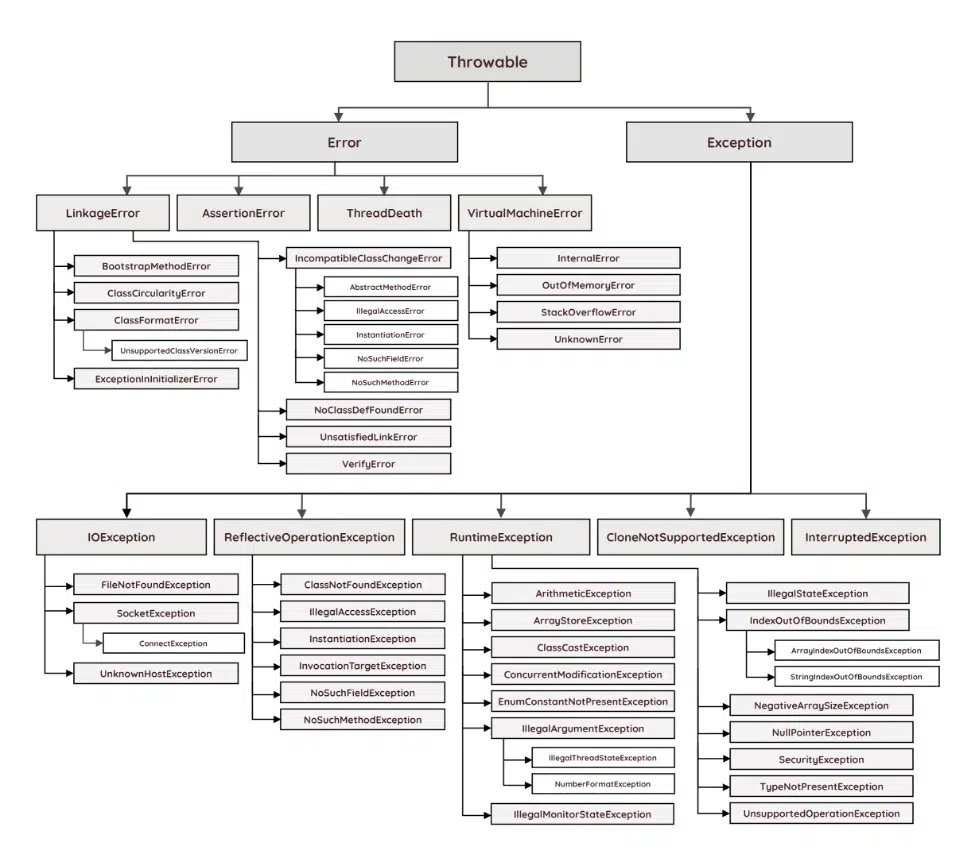
Runtime Exceptions
These exceptions occur during runtime, and the compiler does not force us to handle them.
In [2]:
public class Main {
    public void method1() {
        throw new ArithmeticException("Division by Zero");
    }
}

Main main = new Main();
main.method1();
---------------------------------------------------------------------------
java.lang.ArithmeticException: Division by Zero
	at Main.method1(#12:3)
	at .(#15:1)
In [3]:
Object val = 0;
System.out.println((String)val);
---------------------------------------------------------------------------
java.lang.ClassCastException: class java.lang.Integer cannot be cast to class java.lang.String (java.lang.Integer and java.lang.String are in module java.base of loader 'bootstrap')
	at .(#17:1)
In [4]:
int[] val = new int[2];
val[3];
---------------------------------------------------------------------------
java.lang.ArrayIndexOutOfBoundsException: Index 3 out of bounds for length 2
	at .(#18:1)
In [5]:
String val = null;
val.charAt(0);
---------------------------------------------------------------------------
java.lang.NullPointerException: Cannot invoke "String.charAt(int)" because "REPL.$JShell$16C.val" is null
	at .(#19:1)
In [6]:
Integer.parseInt("abc");
---------------------------------------------------------------------------
java.lang.NumberFormatException: For input string: "abc"
	at java.base/java.lang.NumberFormatException.forInputString(NumberFormatException.java:67)
	at java.base/java.lang.Integer.parseInt(Integer.java:662)
	at java.base/java.lang.Integer.parseInt(Integer.java:778)
	at .(#20:1)
Compile-time Exceptions
These exceptions are checked by the compiler during code compilation. If they are not handled properly, the code will fail to compile.
In [7]:
public class Main {
    public void method1() {
        throw new ClassNotFoundException();
    }
}

Main main = new Main();
main.method1();
|           throw new ClassNotFoundException();
unreported exception java.lang.ClassNotFoundException; must be caught or declared to be thrown
Handling Exceptions Using "throws"
In [8]:
public class Main {
    public void method2() {
        method1();
    }

    public void method1() throws ClassNotFoundException {
        throw new ClassNotFoundException();
    }
}

Main main = new Main();
main.method1();
|           method1();
unreported exception java.lang.ClassNotFoundException; must be caught or declared to be thrown
Handling Exceptions Using "try/catch"
- The
tryblock specifies the code that may throw an exception. - The
tryblock is followed by either acatchblock, afinallyblock, or both. - The
catchblock is used to handle exceptions thrown within thetryblock. - Multiple
catchblocks can be used to handle different types of exceptions.
In [9]:
public class Main {
    public void method2() {
        try {
            method1();
        }
        catch (ClassNotFoundException exception) {
            System.out.println(exception.getMessage());
        }

        System.out.println("Hello");
    }

    public void method1() throws ClassNotFoundException {
        throw new ClassNotFoundException("Class Not Found");
    }
}

Main main = new Main();
main.method2();
Class Not Found
Hello
In [10]:
public class Main2 {
    public void method2() {
        method1();
    }

    public void method1() {
        try {
            throw new ClassNotFoundException("Class Not Found");
        } catch (ClassNotFoundException exception) {
            System.out.println(exception.getMessage());
        }
    }
}

Main2 main = new Main2();
main.method2();
Class Not Found
Catch Multiple Exceptions in a Single Block
In [11]:
public class Main {
    public void method2() {
        try {
            method1("boom");
        }
        catch (ClassNotFoundException | InterruptedException exception) {
            System.out.println(exception.getMessage());
        }

        System.out.println("Hello");
    }

    public void method1(String str) throws ClassNotFoundException, InterruptedException  {
        if (str.equals("dummy")) {
            throw new ClassNotFoundException("Class Not Found");
        } else {
            throw new InterruptedException("Interrupted Exception Occurred");
        }
    }
}

Main main = new Main();
main.method2();
Interrupted Exception Occurred
Hello
Catch all Exception Object
In [12]:
public class Main3 {
    public void method2() {
        try {
            method1();
        } catch (ClassNotFoundException exception) {
            System.out.println(exception.getMessage());
        } catch (Exception exception) {
            System.out.println(exception.getMessage());
        }
    }

    public void method1() throws ClassNotFoundException, FileNotFoundException {
        throw new FileNotFoundException("FileNotFound Exception Occurred");
    }
}

Main3 main = new Main3();
main.method2();
FileNotFound Exception Occurred
In [13]:
public class Main3 {
    public void method2() {
        try {
            method1();
        } catch (Exception exception) { // it should be the last catch block
            System.out.println(exception.getMessage());
        } catch (ClassNotFoundException exception) {
            System.out.println(exception.getMessage());
        }
    }

    public void method1() throws ClassNotFoundException, FileNotFoundException {
        throw new FileNotFoundException("FileNotFound Exception Occurred");
    }
}

Main3 main = new Main3();
main.method2();
|           } catch (ClassNotFoundException exception) {
|               System.out.println(exception.getMessage());
|           }
exception java.lang.ClassNotFoundException has already been caught
Try/Catch/Finally or Try/Finally Block
- The
finallyblock can be used after thetryblock or after thecatchblock. - The
finallyblock is always executed, whether you return from thetryblock or thecatchblock. Only onefinallyblock can be added. - It is mostly used for tasks like closing resources, logging, etc.
- If JVM-related issues occur, such as out-of-memory errors, system shutdowns, or the process being forcefully terminated, the
finallyblock may not be executed.
In [14]:
public class Main {
    public void method2() {
        try {
            method1("boom");
        } catch (ClassNotFoundException | InterruptedException exception) {
            System.out.println(exception.getMessage());
        } finally {
            System.out.println("Hello World");
        }
    }

    public void method1(String str) throws ClassNotFoundException, InterruptedException  {
        if (str.equals("dummy")) {
            throw new ClassNotFoundException("Class Not Found");
        } else {
            throw new InterruptedException("Interrupted Exception Occurred");
        }
    }
}

Main main = new Main();
main.method2();
Interrupted Exception Occurred
Hello World
Why Do We Need Exception Handling?
- It helps keep the code clean by separating error-handling code from the regular code.
- It allows the program to recover from errors.
- It enables us to add more information, which aids in debugging.
- It improves security by hiding sensitive information.
Custom Exception
In [15]:
public class CustomException extends RuntimeException {
    CustomException(String message) {
        super(message);
    }
}
In [16]:
public class Main {
    public void method2() {
        method1();
    }

    public void method1() throws CustomException  {
        throw new CustomException("Hello");
    }
}

Main main = new Main();
main.method2();
---------------------------------------------------------------------------
REPL.$JShell$28$CustomException: Hello
	at Main.method1(#12:7)
	at Main.method2(#12:3)
	at .(#29:1)