Fundamental Concepts|Session 1 to 16
In Java, a name is considered an identifier, which is used for identification purposes. Identifiers can include method names, variable names, class names, and label names.

Rules for Defining an Identifier
- Identifiers cannot start with a digit.
- Only the following characters are allowed:
a-z,A-Z,0-9,$, and_. - Identifiers are case-sensitive; for example,
int x = 50;andint X = 40;are considered different. - There is no length limit for identifiers.
- Reserved words cannot be used as identifiers.
All predefined Java class names and interfaces can be used as identifiers.
System.getProperty("java.version");
21.0.1
int String = 888; // predefined class
String;
888
int Runnable = 999; // predefined interface
Runnable;
999
Reserved Words
Java has 53 reserved keywords:

- Control Flow Keywords: for, break, continue, do, while, if, else, return, switch, case, default.
- Exception Handling Keywords: try, catch, finally, throw, throws, assert.
- Class and Object Keywords: class, extends, implements, package, interface, import, new, instanceof, super, this.
- Data Types and Variables: boolean, byte, char, double, float, int, long, short.
- Access Modifiers: private, protected, public.
- Modifiers: final, static, abstract, synchronized, native, transient, volatile, strictfp.
- Other Keywords: void, enum, goto, const, true, false, null.
Java is a strongly typed programming language that follows strict type checking.
- Is Java a pure OOP language?
- No, it is not considered a pure OOP language because it lacks certain OOP concepts, such as operator overloading and multiple inheritance. Additionally, Java relies on primitive types, which are not objects.
Data Types
Java has 8 primitive data types:
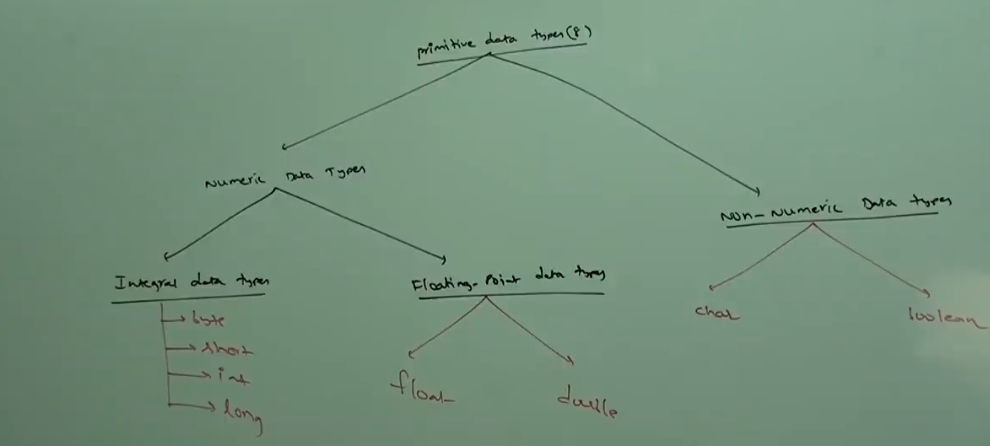
byte(1 byte)short(2 bytes)int(4 bytes)long(8 bytes)float(4 bytes)double(8 bytes)char(2 bytes)boolean
All numeric data types are signed, meaning they can represent both positive and negative values.
Signed bit:
0- positive (+ve)1- negative (-ve)
byte Type
The byte data type is 1 byte (8 bits) and has a range from -128 to 127. It is particularly useful for managing data streams in files or over networks.
Java supports two types of streams:
- Character streams
- Byte streams
byte x = 10;
x = 127;
x = 128;
|   x = 128;
incompatible types: possible lossy conversion from int to byte
x = 10.5;
|   x = 10.5;
incompatible types: possible lossy conversion from double to byte
x = true;
|   x = true;
incompatible types: boolean cannot be converted to byte
short Type
The short data type is 2 bytes (16 bits) in size, with a range from -32,768 to 32,767. It is well-suited for use with 16-bit processors.
short y = 10;
y = true;
|   y = true;
incompatible types: boolean cannot be converted to short
y = 10.5;
|   y = 10.5;
incompatible types: possible lossy conversion from double to short
y = "string";
|   y = "string";
incompatible types: java.lang.String cannot be converted to short
y = 32768;
|   y = 32768;
incompatible types: possible lossy conversion from int to short
int Type
The int data type is typically 4 bytes (32 bits) in size, with a range from -2,147,483,648 to 2,147,483,647.
int z = 21474833648;
|   int z = 21474833648;
integer number too large
int z = 214748336489l;
|   int z = 214748336489l;
incompatible types: possible lossy conversion from long to int
int z = true;
|   int z = true;
incompatible types: boolean cannot be converted to int
long z = 214748336489l;
z;
214748336489
char Type
In Java, the char type takes 2 bytes because it supports Unicode characters. In contrast, older languages like C only support ASCII characters. The range of char is from 0 to 65,535.
char ch = 'H';
ch = null; // ❌ Incompatable type error
long Type
The long data type is typically 8 bytes (64 bits) in size, with a range from -2^63 to 2^63 - 1.
long l = 45L;
float & double Type
Difference between float and double types:
- float
- Use when you need 5 to 6 decimal places.
- Single precision
- 4 bytes
- Range:
-3.4e38to3.4e38.
- double
- Use when you need 14 to 16 decimal places.
- Double precision
- 8 bytes
- Range:
4.9e-324to1.7e+308.
boolean Type
The size of a boolean is not explicitly defined; it mostly depends on the JVM implementation. The allowed values are either true or false.
boolean b = true;
boolean c = false;
boolean v = 0;
|   boolean v = 0;
incompatible types: int cannot be converted to boolean
v = True;
|   v = True;
cannot find symbol
  symbol:   variable v

|   v = True;
cannot find symbol
  symbol:   variable True
int X = 0;

if (X) { // works fne in C/C++
    System.out.println("Hello");
} else {
    System.out.println("World");
}
|   if (X) { // works fne in C/C++
incompatible types: int cannot be converted to boolean
Literals
A literal is any constant value that can be assigned to a variable.
In the statement int x = 10;:
intis the data type/keyword.xis the identifier/variable.10is the constant value/literal.
Integral Literals
Integral data types in Java include:
byteshortintlong
For integral data types, values can be specified in the following formats:
- Decimal (base 10):
int x = 10;- Allowed digits:
0to9.
- Octal (base 8):
int x = 010;- Allowed digits:
0to7.
- Hexadecimal (base 16):
int x = 0x10;- Allowed digits:
0to9andatof(case-insensitive).
Note: Every integral literal (
byte,short,long,int) is by default of typeint.
int x = 10;
int x = 0786; ❌
int x = 0777;

int x = 0xFace;
int x = 0xBeef;
int x = 0xBeer; ❌ // Invalid hexadecimal value (invalid character 'r')
To specify integral literals as long, you must suffix them with l or L:
long l = 0xFaceL; // 64206 in decimal

int x = 10;
long l = 10l;
int x = 10L; ❌ // Invalid: 'L' should be used with long literals only.

long l = 20;
byte x = 010;
short x = 011;
int a = 10;
int b = 010;
int c = 0x10;

// JVM always return output in decimal format
System.out.println(a + "---" + b + "---" + c);
10---8---16
Floating-Point Literals
By default, every floating-point literal is considered a double.
float f = 123.456F;
double d = 123.456;

double d = 0123.456d;
float f = 123.4567d; ❌ // Invalid: 'd' suffix is for double
double d = 01123.456;
double d = 0x123.456; ❌ // Invalid: hexadecimal floating-point literals are not allowed

double d = 0786; ❌ // Invalid: Octal literals are not allowed for floating-point numbers
double d = 0xFace;
double d = 0xF1ace;

double d = 07865.0;
double d = 0xFace.0; ❌ // Invalid: Hexadecimal floating-point literals are not allowed
double d = 0.7777;

double d = 10;
int x = 10.0; ❌ // Invalid: Can't assign floating-point value to an integer

double d = 1.2e3;
float f = 1.2e3; ❌ // Invalid: 'float' literals
f = 1.2e3F;
float f = 123.456;
|   float f = 123.456;
incompatible types: possible lossy conversion from double to float
// floating point literals only you can specifiy in decimal format
double d = 0x123.456;
|   double d = 0x123.456;
malformed floating-point literal
Boolean Literals
The possible values for a boolean are true or false, with the default value being false.
boolean b = true;
boolean b = 1; ❌ // Invalid: cannot assign an integer to a boolean.

boolean b = "true"; ❌ // Invalid: cannot assign a string to a boolean.
boolean b = True; ❌ // Invalid: 'True' is not recognized as a valid boolean.
Character Literals
In Java, a char is assigned using single quotes (''), while double quotes ("") indicate a string literal.
You can declare char literals in four different ways:
1st Way: Direct Assignment
char ch = 'a';
char ch = a; ❌ // Invalid: 'a' should be in single quotes.
char ch = "a"; ❌ // Invalid: "a" is a string, not a char.
char ch = "ab"; ❌ // Invalid: A char can only hold one character.
2nd Way: Integral Literals
You can assign integral literals to char literals in decimal, octal, and hexadecimal formats:
char ch = 98; // 'b'
char ch = 0xFace;
char ch = 0777;
char ch = 65535;
char ch = 65536; ❌ // Invalid: exceeds the maximum value for a char
3rd Way: Unicode Characters
You can use Unicode characters as char literals:
char ch = '\u201F';
char ch = '\u221F'; // ∞
char ch = '\u03C9'; // φ
4th Way: Escape Sequences
You can use escape sequences for special characters as char literals:
char ch = '\n';
char ch = '\t';
The following are eight common escape sequences:
\n- New line\t- Horizontal tab\r- Carriage return\b- Backspace\f- Form feed\'- Single quote\"- Double quote\\- Backslash
char ch = 65536; ❌ // Invalid: exceeds char's maximum value.
char ch = 0xBeer; ❌ // Invalid: 'Beer' is not a valid hexadecimal value.
char ch = '\uface';
char ch = \ubeef; ❌ // Invalid: missing quotes for the escape sequence.
char ch = '\m'; ❌ // Invalid: '\m' is not a recognized escape sequence.
char ch = '\iface'; ❌ // Invalid: Escape sequences can only consist of a single character.
Java v1.7 Features
Java v1.7 introduced two new features:
- Binary Literals
- Underscore (
_) for Long Number Representation
You can specify integral literals in binary format:
int x = 0b1111; // 15 in decimal
To improve readability when representing long numbers, you can use underscores (_) between digits:
long l = 1__23456__789;
long l = 123______456;
The compiler removes the underscores during compilation.
Underscores can only be used between digits; they cannot be the first or last character in a number:
double d = 1_23_456_.78_9; ❌ // Invalid: underscores cannot be placed before or after decimal(.).
double d = _1_23_456.7_8_9; ❌ // Invalid: underscores cannot be placed at the beginning.
double d = 1_23_456.78_9_; ❌ // Invalid: underscores cannot be placed at the end.
double d = 1_23_456.78_9;